

Jacob Jan Founder, Scalable
Writes about commerce AI and creative operations.
Image audit
Your listing image looks the part. But does it make its case?
Before you spend a cent on new creative, score the images you already have on both brains and know exactly what to fix first.
TLDR
- You poured budget into a reshoot and the numbers barely moved, because the real problem was never diagnosed.
- Every product image gets judged two ways at once: how premium it feels, and how clearly it makes its case. Most fixes only touch one.
- You can tell which one your image is failing before you spend, by scoring both instead of trusting your gut.
- Diagnose first, then fix the one thing that is costing the sale.
What does it mean that a listing image is judged twice?
Quick answer
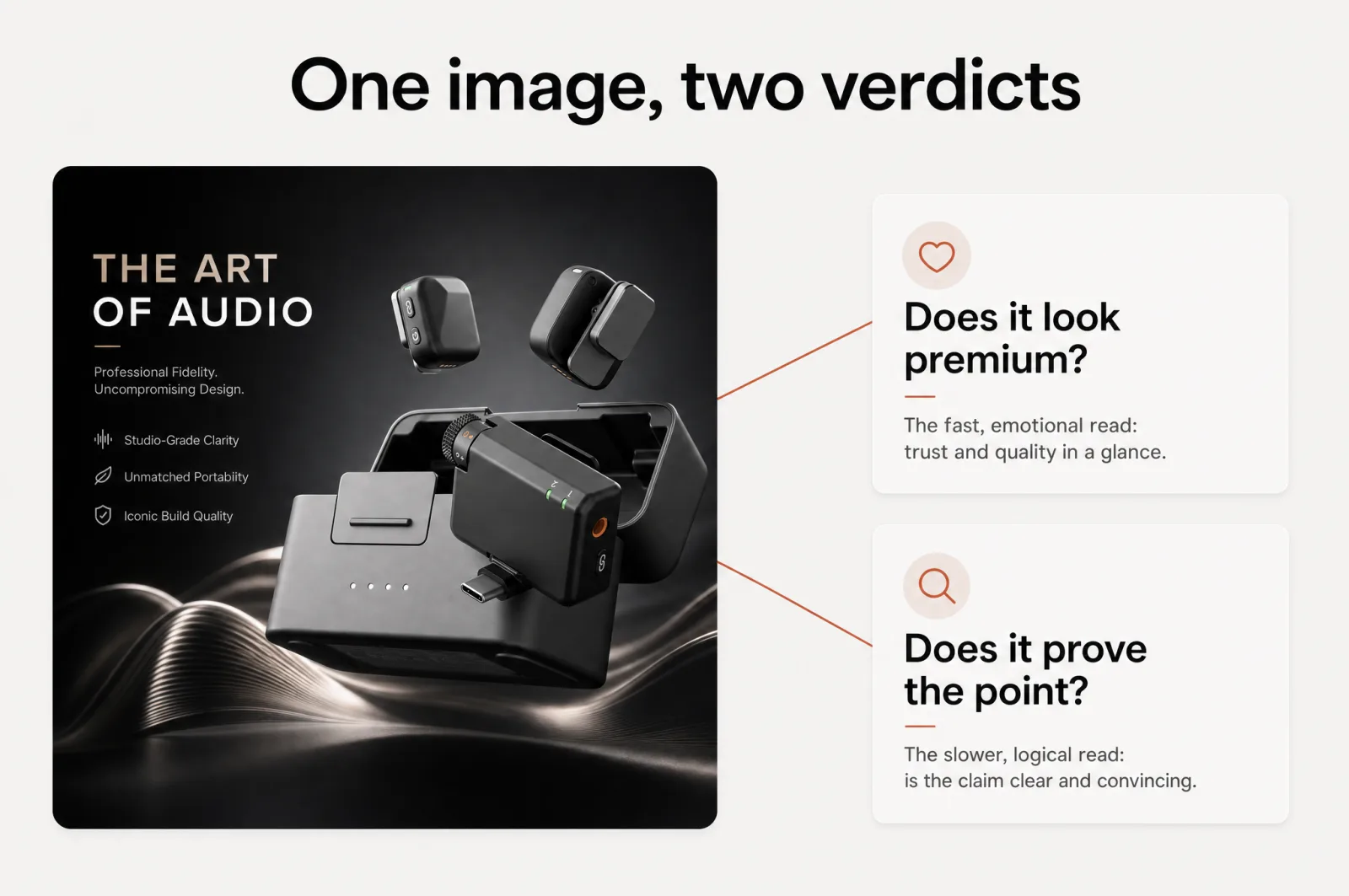
Every time a shopper sees your product image, two parts of their brain grade it at once. The fast, emotional part asks "does this look premium and safe to buy?" The slower, logical part asks "does this prove the point, and can I get it in a glance?" An Amazon listing audit that checks only one of those misses half of why an image wins or loses the sale.
Psychologists have a name for those two parts. Daniel Kahneman calls them System 1 and System 2: one fast, automatic and emotional, the other slow, deliberate and logical [1]. Both fire when a shopper lands on your listing.
System 1 reacts to the look in a fraction of a second. System 2, if it engages at all, checks whether the image backs up the promise. So your main image and every gallery frame face two verdicts, not one.
One verdict is about feeling: is this a brand I can trust, does it read premium, would I be proud to own it. The other is about reason: is the claim clear, is the size obvious, does the frame answer the question in my head.
A great listing image passes both. A weak one usually passes one and quietly fails the other, and you cannot tell which by staring at it harder.
Why a beautiful image can still lose the sale
Here is the trap. You decide your listing looks a little flat, so you book a reshoot or regenerate the set.
New photos land, they are prettier, and the conversion rate does not budge. The polish was never the problem.
Beautiful is only one of the two judgments. An image can look premium and still argue badly: no clear benefit, no scale, no reason to choose it over the listing next to it. It can also argue well and look cheap, where the message is right but the execution undercuts the trust.
Those are two different failures, and they need two different fixes. As we found comparing a general image engine to a purpose-built workflow, pretty is not the same as converting. A reshoot aimed at the wrong failure is money spent to improve a score that was already fine.
This matters more on a product page than almost anywhere else. In Baymard Institute's large-scale usability testing, 56% of shoppers went straight to the product photos the moment they arrived, and blurry or unclear ones drove them away [2]. Images carry the decision, which makes them the most direct lever in ecommerce conversion optimization.
By Scalable's own read, the average e-commerce listing scores around 3.7 out of 10 on content quality. Most sellers are competing with mediocrity, not excellence. The opportunity is real; the catch is knowing which end of it to pull.
The 4 dimensions your image is scored on
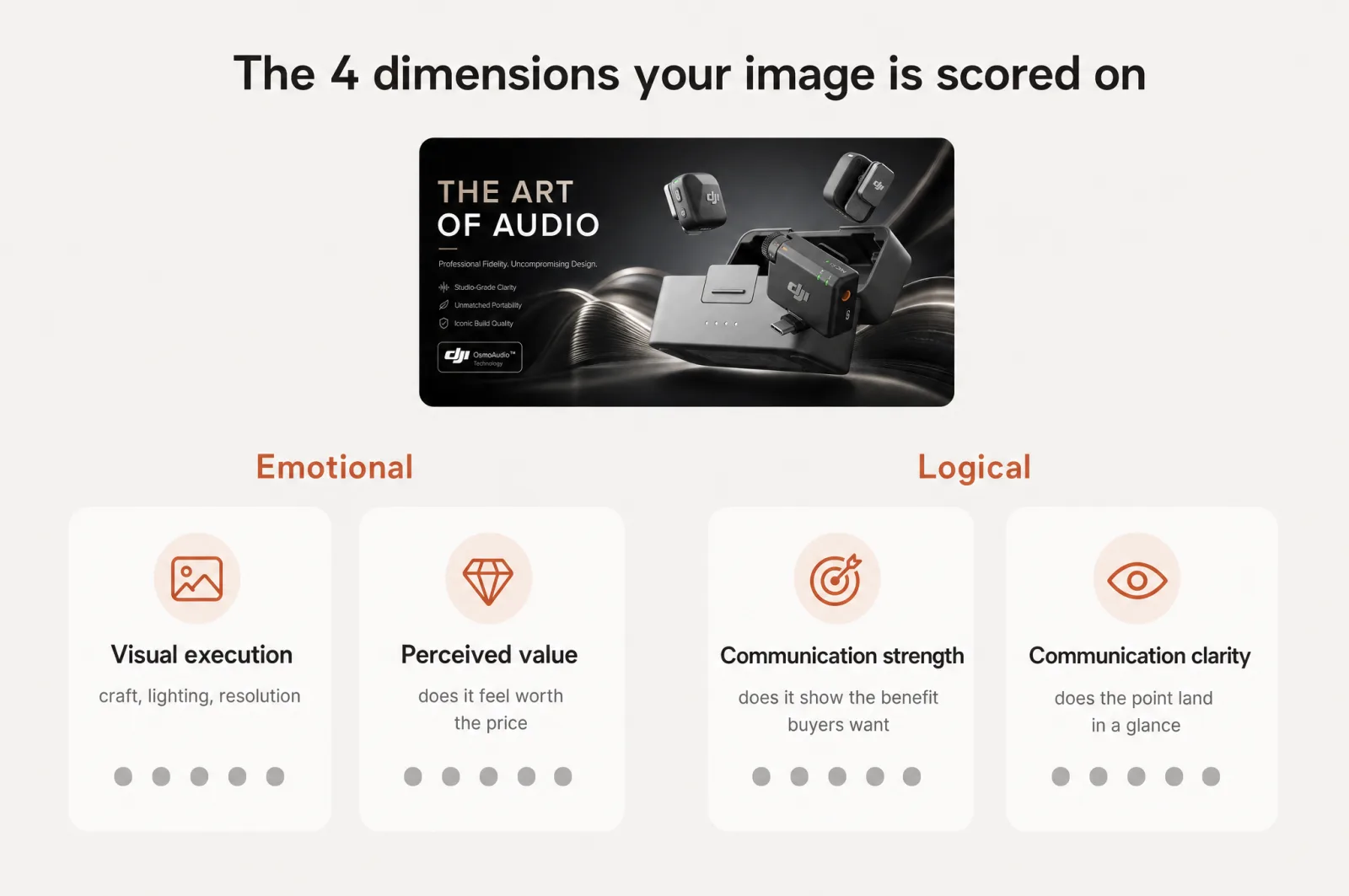
The two brains split into 4 things you can grade. Score each image on all 4 and the vague feeling of "this could be better" turns into a diagnosis.
On the emotional side:
- Visual execution. The craft. Lighting, composition, resolution, how intentional the frame looks. This is what makes an image read as professional in the half-second before anyone reads a word.
- Perceived value. Whether the image makes the product feel worth the price. Two products can be shot equally well and still land at different value tiers because of how they are staged.
On the logical side:
- Communication strength. How well the image makes its case. Does it show the benefit buyers care about, the one their reviews keep mentioning, or just a nice picture of the object?
- Communication clarity. Whether the point lands in a glance. Most shopping now happens on a phone, on a small tile, in a hurry. If the message needs squinting, it did not land.
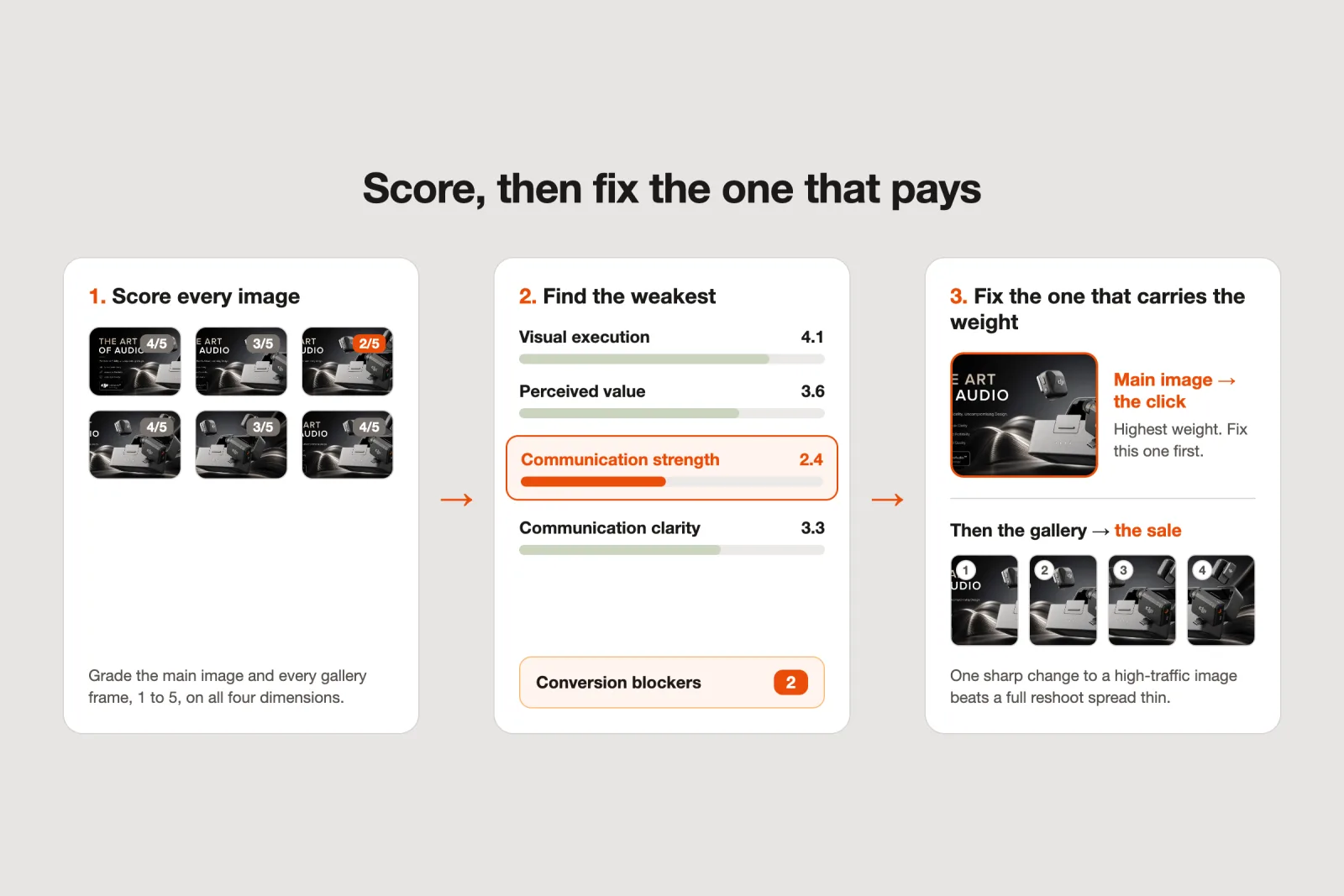
Give each image a quick 1 to 5 on all 4, the main image and every gallery frame, and your lowest column is where the money is leaking.
Clarity has an objective floor you can check yourself. Amazon requires the main image to sit on a pure white background with the product filling about 85% of the frame [3]. That is the minimum for legibility in search, not a stretch goal, and there is more room to win the click inside those rules than most sellers use.
Plenty of listings still miss the floor, and every one of them is leaking clarity before the shopper even taps in.
Benchmark against the category leaders, not your gut
The hardest part of judging your own images is that you are too close to them. You know the product, so you read meaning into a frame that a first-time shopper never will. That closeness, not any lack of taste, is what makes your own listing so hard to grade.
So do not trust your own eye here. Measure against the top of your category instead. A useful audit scores each image against a category-leader target, roughly the top 10% of listings in your niche, so "good" is defined by the market you compete in rather than by flattery.
That is also the number that settles arguments. When a client or a co-founder insists the images are fine, a score against the leaders is harder to wave away than an opinion.
The same score does double duty if you audit listings for clients. The recurring complaint we hear from agencies is "the client blames my ads, but their listing is trash, and I cannot prove it without hours of manual work." A dimension-by-dimension score against category leaders is that proof, produced in minutes instead of an afternoon.
Find the weakest dimension, then fix that first
With 4 dimensions across every image, that is a lot of data. The point of scoring is not to admire the spreadsheet, it is to find the one change with the most payoff.
Roll the scores up and 3 things fall out: an overall number, the single weakest dimension across the set, and a count of conversion blockers, the things your buyers care about that your images never communicate. That trio is your work order. You stop "improving the listing" in the abstract and start fixing one dimension, on the image that carries the most weight, to clear a specific blocker.
That weight is not spread evenly. The main image wins or loses the click, so a clarity problem there costs you traffic before conversion even enters the picture. The first gallery frames carry the objections, so a communication gap in slot 2 or 3 is where a ready buyer quietly backs out.
Fix in that order. One sharp change to a high-traffic image beats a full reshoot that spreads effort thin and still misses the real gap.
This is exactly what Scalable's Image Audit does inside the product. It grades every current image, main and gallery, on all 4 dimensions, groups them emotional against logical, benchmarks each against the category-leader target, and hands you the weakest dimension, the blocker count, and a per-image fix. It runs on your own listing and your category, so the diagnosis is about your product, not a generic checklist.
Run an Amazon listing audit before you reshoot
The old way is to spend first and find out later: pay for new creative, push it live, and hope the numbers move. That is a bet placed blind, and blind bets on creative are what has burned every seller who tried an agency, a freelancer, and a hire and still does not have a listing they are proud of.
There is a cheaper order of operations. Score the images you already have, on both brains, and let the weakest dimension tell you what to fix. Sometimes the answer is a reshoot; more often it is a clarity fix, a stronger message, or one gallery frame that finally answers the objection, none of which needs a camera.
Either way you spend on the fix you can name, not the one you guessed at. That is what Amazon listing optimization looks like in the right order: diagnose, then fix.
You can run an Amazon listing audit on your current images before you touch a thing. Add a product to Scalable, and the dual-brain Image Audit scores every image against the leaders in your category and shows you the one fix that moves the sale.
Your first one is free. Diagnose first, then decide what is worth reshooting.
Frequently asked questions
- What is an Amazon listing image audit?
It is a scored review of the images already on your listing, judged the way a shopper's brain judges them: on how premium and trustworthy they look, and on how clearly they prove the product's case at a glance. A good audit grades each image on both, benchmarks it against the leaders in your category, and tells you which image is costing sales before you pay for new creative.
- Why does a product image look great but still not convert?
Because looking great is only half of the judgment. A shopper decides fast and emotionally on whether the image feels premium, and slowly and logically on whether it makes the case. An image can nail the first and fail the second: beautiful, but it never proves the point or gets understood in a glance. Fixing the polish when the problem is the argument leaves the sale on the table.
- How do I decide which listing image to fix first?
Score every image on the two axes, then find the single weakest dimension across the set and count the blockers, the things buyers care about that your images never communicate. Fix the weakest dimension first, on the image that carries the most weight. That is usually the main image for clicks and the first gallery frames for the sale. Prioritize by impact, not by what is easiest to redo.
- Should I reshoot my Amazon images or fix the ones I have?
Diagnose before you decide. A reshoot is expensive and slow, and it only helps if the problem is one a reshoot solves. If the audit shows the images look premium but argue badly, you need clearer messaging and structure, not a new camera. Score first, and let the weakest dimension tell you whether the fix is visual execution, the argument, or both.
Sources
- 1.System 1 and System 2 Thinking (on Kahneman, Thinking, Fast and Slow), The Decision Lab
- 2.Ecommerce Conversion Rate Optimization, Baymard Institute
- 3.Product image guide, Amazon Seller Central
- 4.Stop gambling on your Amazon listing
- 5.The Q4 catalog refresh: Amazon listing optimization for peak season without a photoshoot
- 6.Design for the Amazon thumbnail: listing images that still sell on a phone
Built by someone who’s lived it.
I’ve been in e-commerce since 2018. I built and exited my own brand, then spent 5+ years running a creative agency for product companies, shipping the listings, ads, and content that move real sales.
Filed under
Launch your full Amazon listing in minutes, in-house and on-brand
Main image, gallery, A+, ads, translations and variations. Built on your reviews, optimized for conversion.
Next recommended read
Scalable vs Higgsfield for Amazon A+ content: pretty isn't the same as converting
Higgsfield makes beautiful visuals, but Amazon A+ content has to convert. See how a data-driven, purpose-built workflow compares to a general AI generator.
10 min read
More on this topic — playbooks and product deep-dives.

Amazon main image requirements: stay compliant and still win the click
The Amazon main image requirements in full, plus how to lift click-through without breaking a rule or getting your listing suppressed.

How to make an Amazon main image that wins the click
Your Amazon main image decides the click. Learn what moves CTR, what the rules allow, and how to test a portfolio of proven strategies fast.

Your best Amazon gallery images are hiding in your reviews
Amazon listing optimization starts in your reviews: a 4-step method to find conversion drivers, close communication gaps, and build gallery images that sell.