
Jacob Jan Founder, Scalable
Writes about commerce AI and creative operations.
Listing optimization
Amazon main image requirements: stay compliant and still win the click
Every main image rule Amazon enforces, and how to optimize for clicks inside the lines.
TLDR
- The first thing a shopper sees can win you the click, or quietly get your whole listing pulled from search.
- Amazon's rules for that image are strict and specific, and breaking one is a fast route to suppression.
- You do not have to choose between clicks and compliance. The moves that win the click all live inside the rules.
- This guide gives you every requirement, the real consequences, and how to optimize without risking your listing.
Amazon main image requirements: stay compliant and still win the click
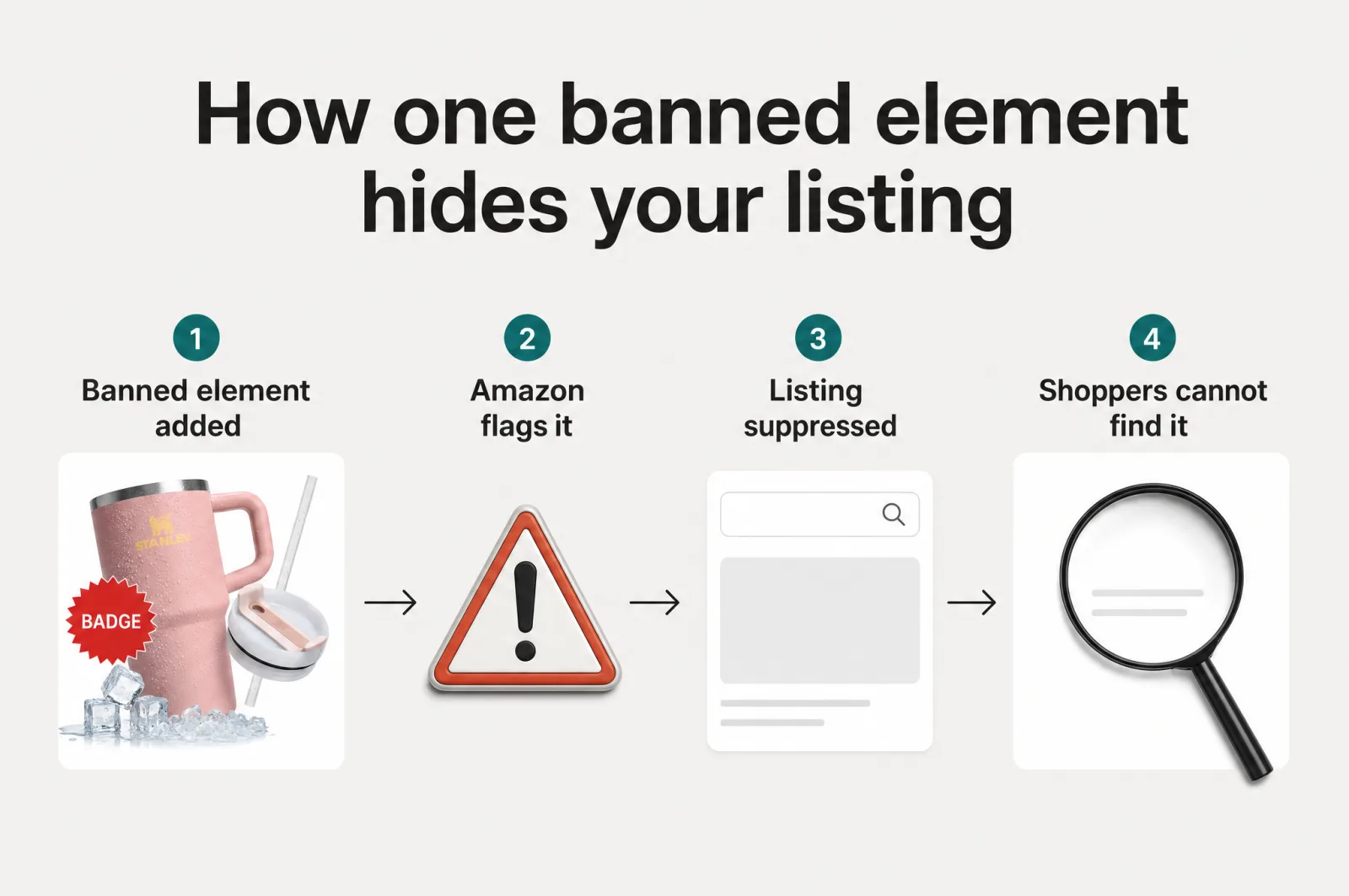
The main image is the first thing a shopper sees and the pixel your click-through rate rides on. It is also the most tightly policed image on your listing. Add a badge, a splash of lifestyle, or a "50% off" flash to chase clicks, and Amazon can suppress it from search until you replace it [1]. The click you were fighting for vanishes with the whole page.
Here is the good news. Compliance and click-through are not a trade-off. Once you know exactly what Amazon requires, the moves that win clicks all live where Amazon already allows them. This guide walks the full Amazon main image requirements, what happens when you miss one, and how to optimize it for clicks without gambling your listing.
What are Amazon's main image requirements?
Quick answer
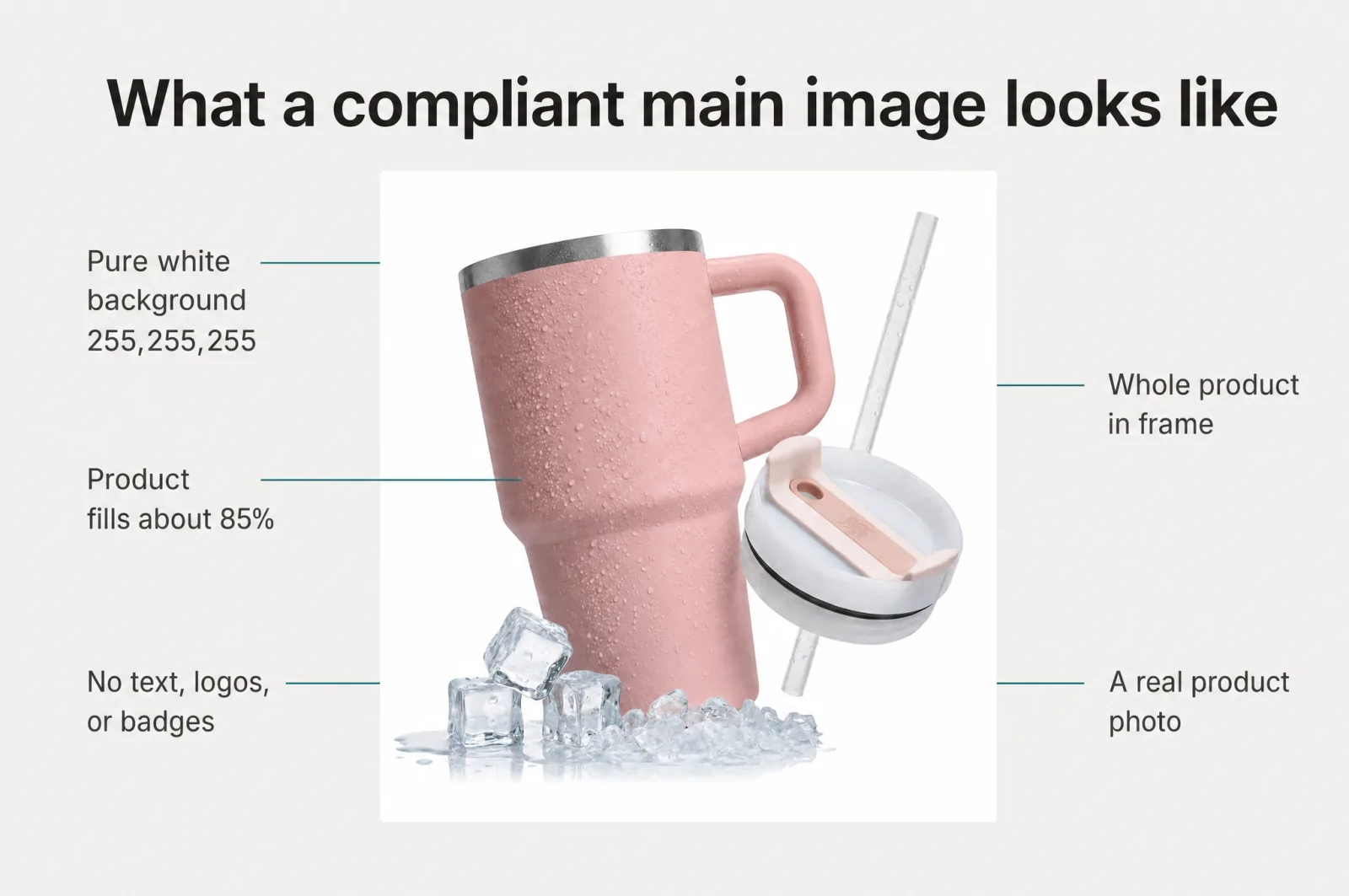
Amazon's main image requirements are the rules for the primary photo on a listing: a pure white background (RGB 255, 255, 255), the product filling about 85% of the frame, the whole product in view, and no text, logos, borders, watermarks, or props that aren't part of the product. The image must be a real photo of the item for sale, at least 500 pixels on the longest side. Break these and Amazon can suppress the listing from search.
Every product on Amazon must have at least one compliant main image, held to a higher bar than the rest of your gallery [2]. It is what shows in search results, so Amazon keeps it clean and uniform: shoppers should compare products, not decode competing graphics. It is also the thumbnail buyers scan in the search grid, so it has to read at thumbnail size. The rules below are the whole checklist.
The exact Amazon main image rules
These are the requirements Amazon publishes for the main image, in plain terms [2].
| Requirement | What Amazon asks for | What breaks it |
|---|---|---|
| Background | Pure white, RGB 255, 255, 255, so it blends into search and detail pages | Any non-white, textured, or scene background; a visual frame or border on the edges |
| Product size | The product fills about 85% of the frame | A tiny product lost in white space, or one cropped by the edge |
| On-image content | Nothing but the product | Text, logos, borders, color blocks, watermarks, or graphics over the product or background |
| Props | Only what is included in the purchase | Accessories or props that are not part of the product and could confuse the shopper |
| Framing | The entire product in view; multi-piece sets shown in true relative size | Cutting off part of the product, or enlarging one piece of a set |
| Realism | A real photo that accurately represents the product | Illustrations, or an image that does not match the title |
| File + size | JPEG (recommended), TIFF, PNG, or non-animated GIF; 500 to 10,000 pixels on the longest side; sharp, not pixelated | Files under 500 pixels, blurry renders, or jagged edges |
Two rules catch sellers out because they feel like normal marketing. First, badges and claims are banned on every image, not only the main one: no Best Seller or Amazon's Choice lookalikes, no 5-star or review imagery, no "free shipping" flashes [2]. Second, only a small set of product categories may use a lifestyle photo as the main image, and even those carry no text or extra logos [3]. When in doubt, keep it a clean shot of the product on white.
What happens if you break the rules
Watch out
If any image fails the requirements, Amazon can suppress the listing from search until you upload compliant images [1]. It still exists, but shoppers cannot find it in search results, so your traffic and sales stall until the fix goes live.
This is why the stakes here run higher than they look. A non-compliant main image does not just underperform. It can pull the product from the one place most of your buyers start. Sellers hit this exact wall when a background is not quite white, a stray border sits on the edge, or a badge sneaks onto the frame [1]. The optimization you added becomes the reason nobody sees the product.
The click-versus-compliance trap, and why you can skip it
The temptation is obvious. The moves that feel like they should lift clicks all do the same thing: a bold callout, a "best seller" badge, a lifestyle scene, a comparison graphic. Every one of them is banned on the main image. So sellers assume the choice is binary: play it safe and stay invisible, or push hard and risk suppression.
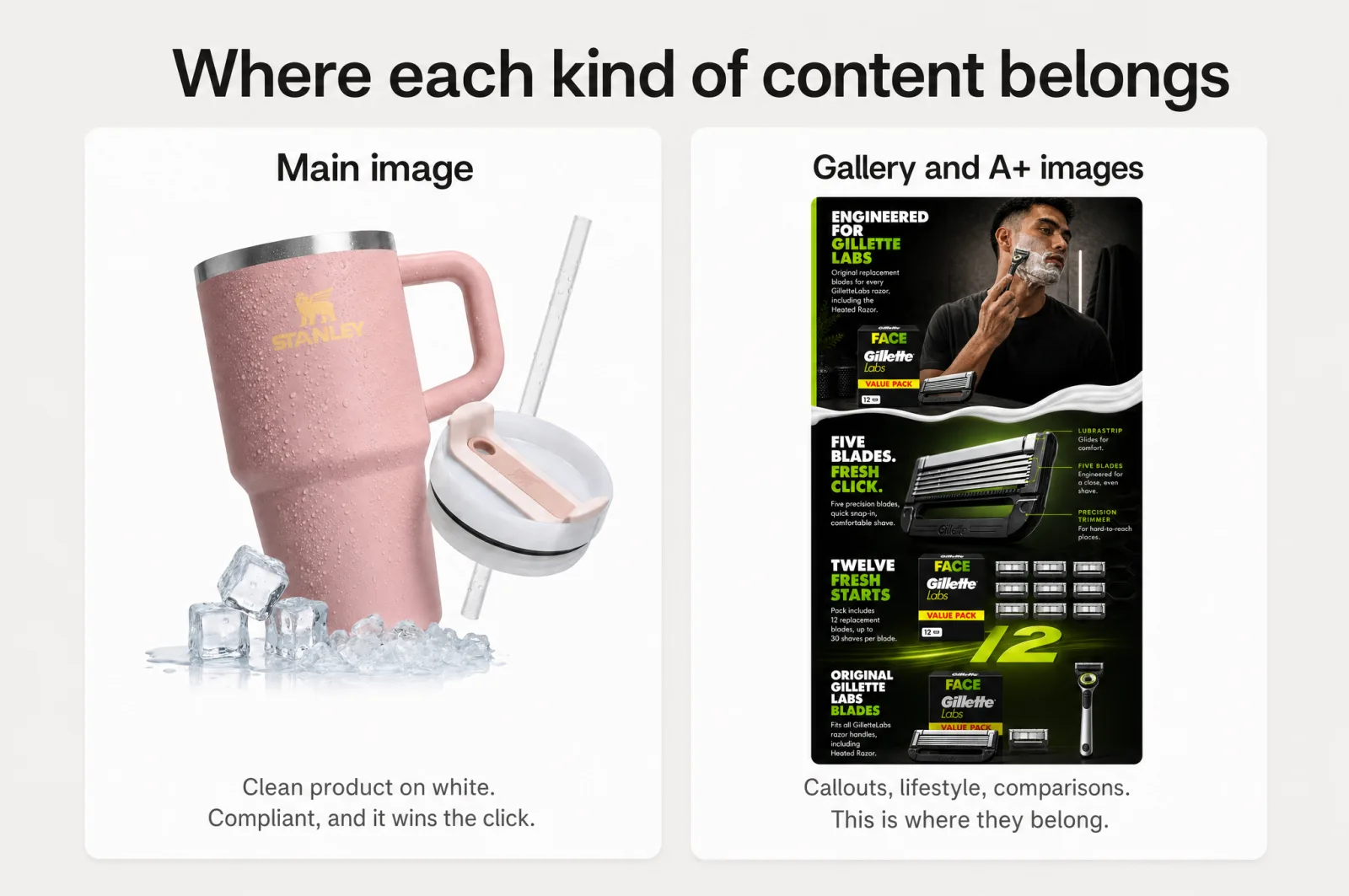
That trap is a false choice. The main image is one slot in a listing built to sell, and the first move in any serious Amazon listing optimization. Its job is simple: win the click with a clean, instantly readable frame. Every persuasion move you wanted belongs next door, in the gallery images and A+ content, where headlines, feature callouts, and lifestyle scenes live. Keep it compliant, and put the selling story where shoppers expect it and Amazon allows it. For the click-through tactics themselves, our guide on how to make an Amazon main image that wins the click goes deeper on the levers.
Compliant ways to lift click-through
Inside the rules, you still have real levers. Each one moves clicks without touching a requirement.
- Fill the frame. Amazon lets the product take 85% of the image, so use it. A photo scaled to the max reads bigger and more confident in the search grid than one floating in white.
- Pick the angle that reads in a second. Shoppers decide fast. A hero shot that shows the product's shape and purpose at a glance beats a flat, ambiguous one.
- Render it sharp and go large. Amazon's main image size runs up to 10,000 pixels on the longest side, so a crisp, high-resolution file lets shoppers hover to zoom and inspect the product before they click away.
- Use color that stands out against white. The search page is a sea of plain-white tiles. A product whose real color or finish contrasts with that grid pulls the eye without a single banned graphic.
- Show the truth clearly. If it is a multipack or a specific size, make that honest in the frame. Accurate expectations mean better clicks and fewer returns, and multi-piece sets must appear in true relative size anyway.
None of these need text, badges, or a scene. They are pure craft on a compliant image, exactly the kind of Amazon image optimization the rules leave open, and where a tool that knows the rulebook earns its place.
How Scalable generates compliant, click-optimized main images
Getting there by hand means learning Amazon's rulebook, then testing angles, scale, and color one render at a time. Scalable does both at once.
Its attraction strategies, the main-image CTR hub, generate your image against 21 proven click-through strategies, and each one carries its own compliance guidance, so you always know which moves are safe for the main slot and which belong on the gallery. When you need a guaranteed-clean version, a TOS-compliant, max-accessibility mode strips callouts and badges and produces a shot that meets Amazon's requirements. You do not need Photoshop, a photographer, or Amazon's rulebook memorized: upload your product photo, pick a strategy, and every reference is graded with a specific fix before you generate, so you never build on a bad input.
The strategies run in parallel, so you get a set of variants to test in minutes, each flagged for main-slot compliance, instead of grinding out one render at a time and hoping it clears the rules. The output is a photoreal render that accurately represents your real product, so it satisfies Amazon's real-photo requirement while looking premium. The gallery and A+ slots then carry the callouts and lifestyle the main image cannot. It is the same engine behind 127k+ assets generated every month for 7.5k+ brands and agencies, from solo sellers to enterprise teams, built so the output stays on-brand instead of looking like generic AI.
Make your main image compliant and click-worthy
You do not have to pick between a main image that follows Amazon's rules and one that earns the click. Compliance and the click point the same way: a clean, sharp, well-framed shot of the real product.
Generate compliant, click-optimized main images for your listing, free.
Frequently asked questions
- Does an Amazon main image have to be on a white background?
Yes. Amazon requires the main image to sit on a pure white background, defined as RGB 255, 255, 255, so it blends into the search and detail pages. Only a limited set of product categories may use a lifestyle main image, and even then it carries no text or extra logos. A non-white background can get the listing suppressed from search until you fix it.
- Can I put text or a logo on my Amazon main image?
No. The main image cannot carry text, logos, borders, color blocks, watermarks, or any graphics over the product or in the background. Amazon-style badges like Best Seller or Amazon's Choice and claims like free shipping are banned on every image, not just the main one. Save headlines, callouts, and lifestyle scenes for your gallery images and A+ content.
- What is the Amazon main image size?
The Amazon image size range runs from 500 to 10,000 pixels on the longest side, in JPEG, TIFF, PNG, or non-animated GIF. JPEG is recommended. Go large and sharp: a high-resolution image well above the 500-pixel minimum enables the hover-to-zoom feature, which lets shoppers inspect the product before they buy.
- Will a Best Seller badge get my Amazon listing suppressed?
It can. Badges that copy Amazon's own, such as Best Seller or Amazon's Choice, plus 5-star or review imagery and shipping claims, are prohibited on all product images. If any image breaks the requirements, Amazon may suppress the listing from search until you upload compliant images, so the badge risks the very visibility you added it for.
- How do I optimize the main image for clicks without breaking the rules?
Work the levers Amazon allows: fill 85% of the frame with the product, choose an angle that reads instantly, render it sharp, and pick a product color or finish that stands out against the white search grid. Test several compliant versions rather than betting on one. Move persuasion like callouts and lifestyle into your gallery and A+ content.
Sources
Built by someone who’s lived it.
I’ve been in e-commerce since 2018. I built and exited my own brand, then spent 5+ years running a creative agency for product companies, shipping the listings, ads, and content that move real sales.
Filed under
Launch your full Amazon listing in minutes, in-house and on-brand
Main image, gallery, A+, ads, translations and variations. Built on your reviews, optimized for conversion.
Next recommended read
Stop gambling on your Amazon listing
Amazon listing optimization is sold as a blind bet: pay, wait weeks, hope it converts. Here is how to own your listing content and see the result first.
9 min read
More on this topic — playbooks and product deep-dives.
Design for the Amazon thumbnail: listing images that still sell on a phone
Most shoppers meet your listing as a tiny Amazon thumbnail on a phone. 5 rules for listing images that stay legible and sell at small size.
The Q4 catalog refresh: Amazon listing optimization for peak season without a photoshoot
Amazon listing optimization for Q4: refresh every listing for Prime Day and BFCM without a photoshoot. What to change, what to leave, and a dated plan.

The EU AI Act and ecommerce: what you actually have to do about AI content
What the EU AI Act means for ecommerce brands using AI content: the transparency rule that matters, the 2026 timeline, and a plain checklist. Not legal advice.