
Jacob Jan Founder, Scalable
Writes about commerce AI and creative operations.
Brand systems
How to keep a growing catalog on-brand with a brand kit generator
Lock your brand once and every listing inherits it, in minutes, without a designer on retainer.
TLDR
- Scroll your own listings back to back and they can look like 5 different vendors made them.
- A disjointed catalog quietly reads as riskier and less premium, capping trust on every product you sell.
- You do not need a designer on retainer or a 40-page manual to fix it. You need a look you set once.
- Lock your colors, type, and vibe in one place and every new listing inherits them, in minutes.
Your catalog looks like 5 different vendors
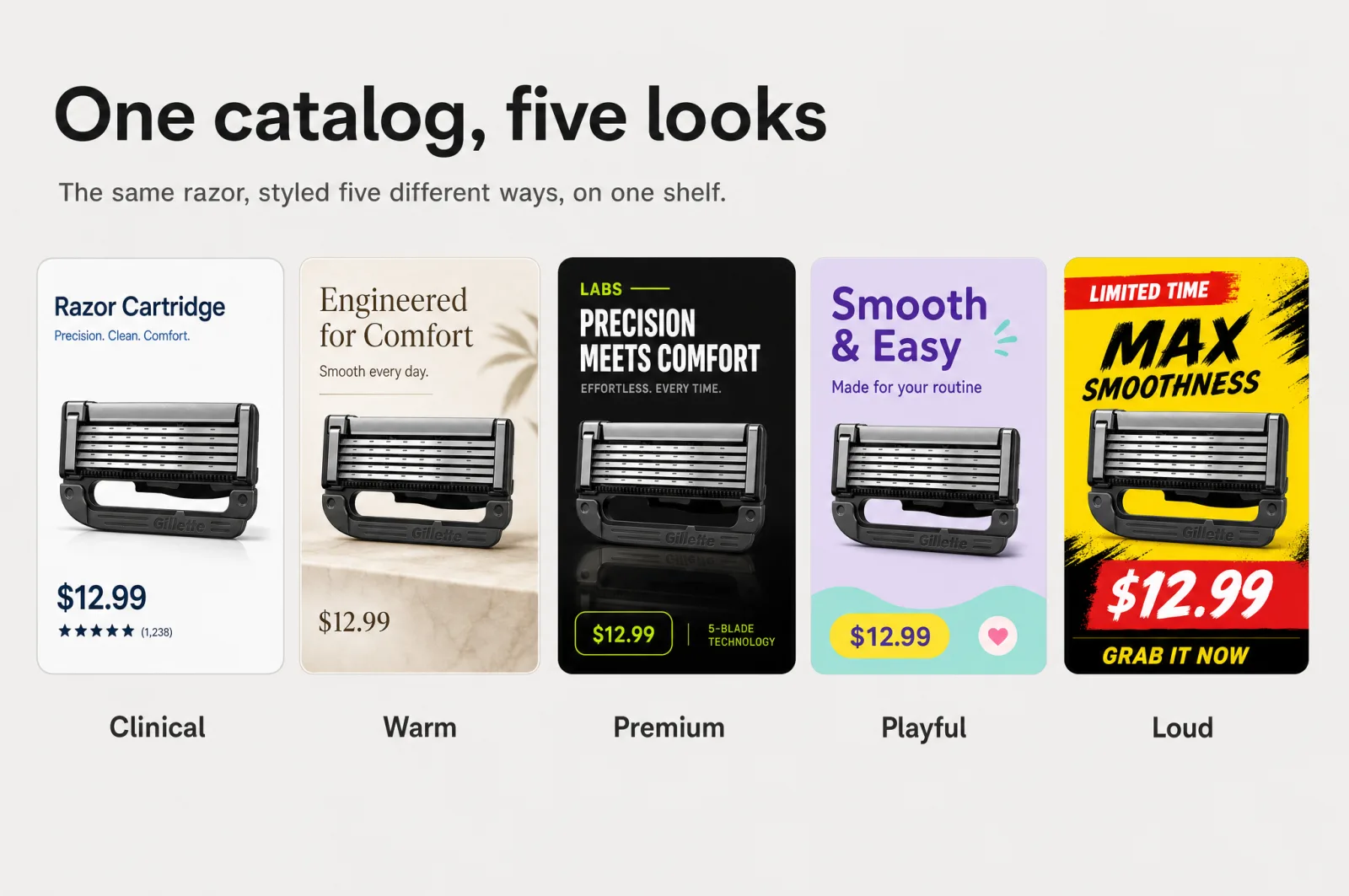
Scroll your own catalog the way a shopper does, one listing after the next. If each product looks like a different company made it, you already feel the problem.
The fix is not more design hours. It is a brand system, and a brand kit generator is how you set it once and hand it to every listing you own.
That first flick of the thumb matters. Shoppers form a first impression in about 50 ms, before they read a word of your copy [1]. In that blink they are judging one thing: whether your brand looks like it has its act together.
A catalog that shifts color, type, and mood from one SKU to the next answers that badly, over and over. You have probably felt it as a small wince. The product is great, the listing beside it just looks sharper.
None of this happens because a single image is bad. Most of your listings are fine on their own. The gap shows up only when a shopper sees them as a set, which a growing catalog always is.
What an inconsistent catalog costs you
The wince is a conversion signal you can read. Consistency is how a brand becomes recognizable, and recognition earns trust before any argument is made.
When your listings share one look, a returning shopper knows it is you on sight. A newcomer reads you as established rather than improvised. Companies that present their brand consistently everywhere have linked that discipline to revenue lifts of 10% to 20% [2].
That figure is directional and self-reported, but the direction is the point: showing up the same way pays. Now run it in reverse.
A catalog stitched together from different freelancers, tools, and months reads as riskier and less premium, even when every product is excellent. Shoppers cannot audit your supply chain in the aisle, so they lean on the cue in front of them. Mismatched imagery quietly drags on click-through and conversion across every listing at once.
You rarely catch it in one report, because it spreads thin over the whole catalog. And the more products you add, the more that drag compounds. You can hide one weak cousin behind 10 polished listings; a few hundred half-matched ones set the tone for the whole brand.
A second cost is easy to miss: your team's time. Every inconsistent listing becomes a future cleanup, a redo, a "make this match the others" thread. That work pulls people off the next launch, and fixing drift after the fact is always slower than never creating it.
Why the old way can't keep a catalog consistent
The old way of staying on-brand was to police it by hand, and policing does not scale.
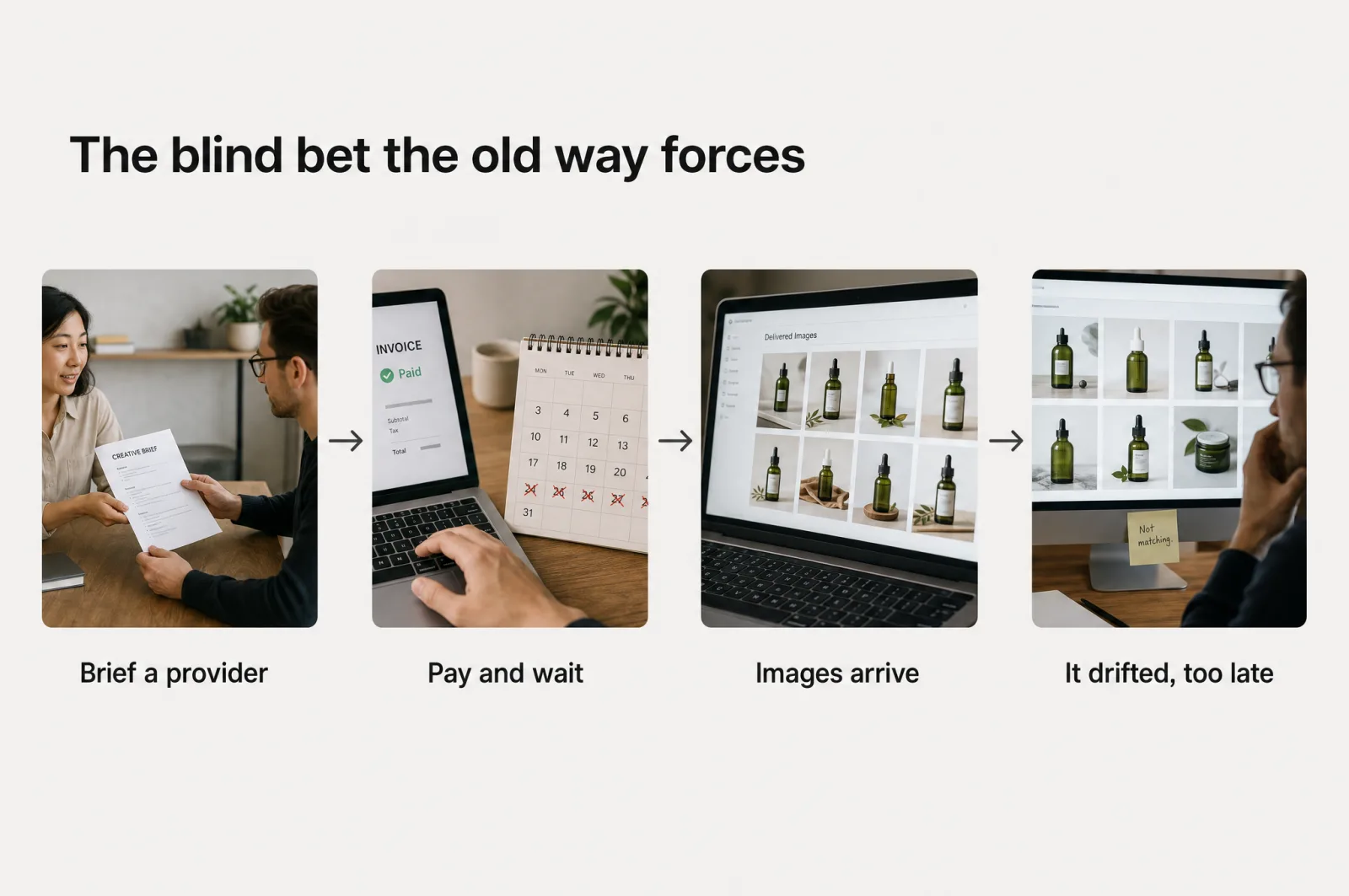
Think about how consistency was supposed to happen. You brief a freelancer per listing over several days, or an agency over several weeks, and each one reads your brand a little differently. You could hire in-house instead, but a creative-plus-analytical bench is slow to staff, risky to lead, and expensive to keep.
So you write a guidelines document to hold the line. It sits in a drive nobody opens under deadline. Reach for a generic AI image tool to move faster and every generation drifts again, because a one-off prompt has no memory of the last image you liked.
Speed only makes that worse. The faster you generate, the faster small inconsistencies pile up. A tool that makes beautiful one-off pictures with no memory of your brand just helps you scale the problem.
None of these fail because your team is careless. They fail because your brand lives in people's heads and in a PDF, not in the pipeline that makes the images. So the check always happens after the fact.
You find out a batch went off-brand once the catalog is already live and looks like 5 brands sharing a shelf. The real villain here is not the reader. It is the blind bet the old way forces on you: brief, pay, wait, and only then learn whether the work held together.
Every provider gets picked on a portfolio and a promise. Whether the output fits your brand only shows once the money and the weeks are already spent. A growing catalog places that bet again on every launch.
A brand system, defined simply
It is not taste, and it is not a 40-page manual, just a small set of reusable rules that any image can inherit.
Strip it down and only a few decisions are worth locking:
- Color: the palette every listing draws from, down to the exact hex values.
- Type: the fonts your on-image headlines and callouts use.
- Vibe: the mood and styling, whether clinical, warm, or premium.
- Models and treatment: how your product is staged, and who, if anyone, appears with it.
Settle those four and you close off almost every way a listing can wander off-brand. That is what a good AI brand kit captures: the concrete rules a machine can apply the same way a thousand times, not a philosophy of your brand. A brand guidelines generator that outputs this as a reusable object, rather than a document, turns "stay on-brand" from a hope into a default.
If your brand is already defined, the system starts from your real assets and guidelines. It enforces the identity you already run on instead of inventing a new one, so you stay the single source of truth.
The shift is subtle but total. You stop approving every image and start approving the system once. After that, being on-brand stops being a task you repeat and becomes a property your listings have.
This is why a system beats a style guide. A guide describes the rules and trusts a human to apply them under deadline.
A system wires those rules into the step that makes the image, so applying them is neither optional nor extra work. The difference is the difference between a speed limit sign and a speed limiter.
Lock it once, apply everywhere
Here is where the manual model inverts. Instead of briefing your brand into each listing, you build the system once from your own assets and let every one pull from it.
It starts with what you already have. Upload up to 5 brand assets as inspiration: a logo, some packaging, an old ad, a photo. A brand kit generator reads them and returns 3 finished directions in about 6 min:
- Matched: strict guidelines built straight from your assets, for when your brand is set and you want it followed exactly.
- Polished: the same identity, tightened and optimized, for when you know the look could be sharper but have not had the time.
- Reimagined: a bolder direction built from your product, audience, and market, for when you would rather stand out than blend in.
You are not squinting at a text description, either. Each option arrives as a one-page vibe board with your palette, type, textures, and lifestyle imagery. A demo grid shows the look on a real product before you spend a cent on production.
You review 3 complete options side by side and lock the one that fits. Then the important part happens quietly.
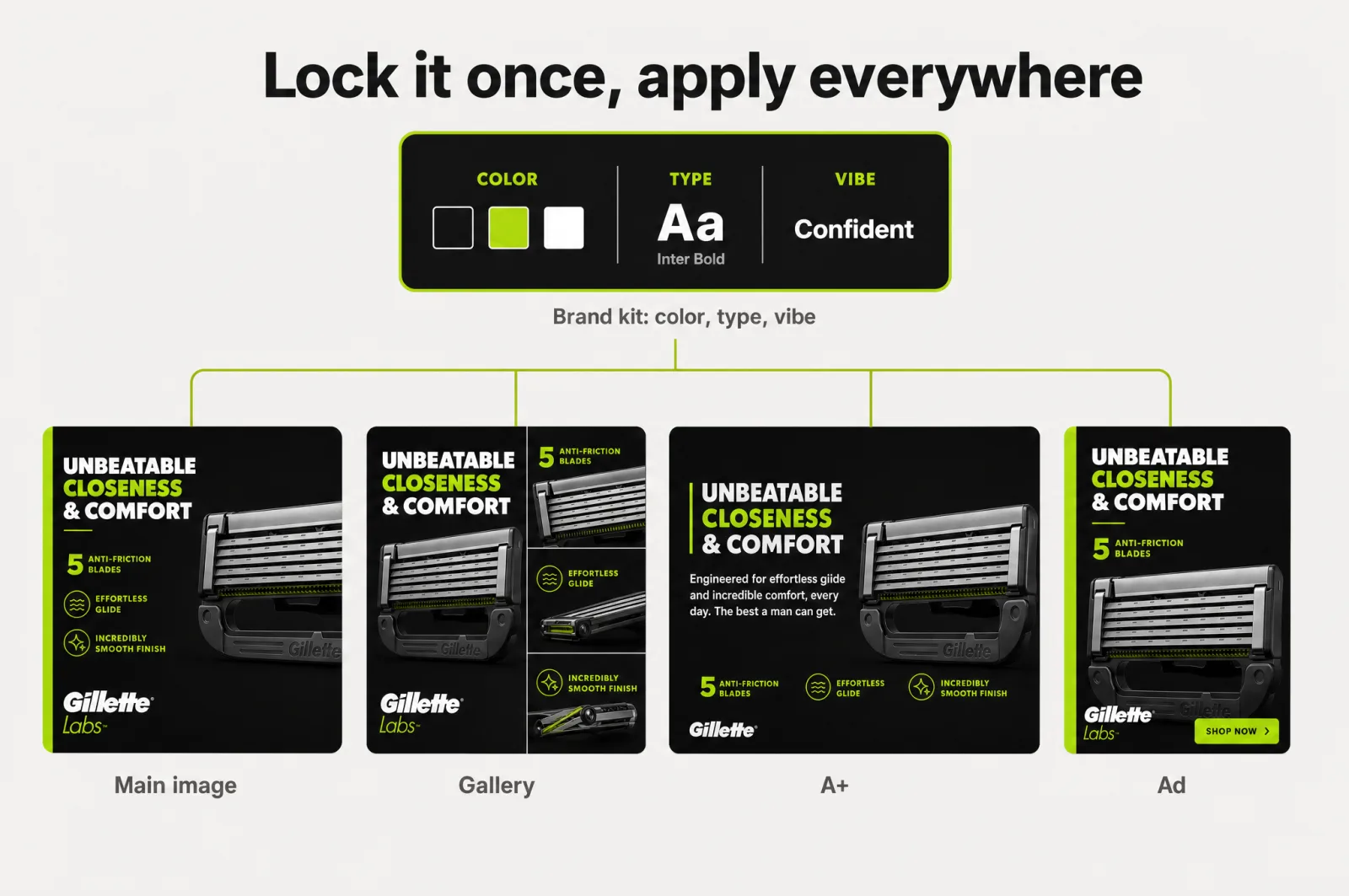
Once a kit is attached, every image you generate inherits it: the colors, the type, the vibe, applied automatically, with no re-briefing and no re-prompting. The choice you least wanted to make alone, how your brand should look, becomes a decision you make once and reuse forever.
Consistency at scale, without a designer
This is where a growing catalog stops fighting itself. With a kit locked, consistency is no longer something you supervise.
Every SKU, every format, and every marketplace starts on-brand by default. The locked kit also keeps that output premium instead of generic.
The same brand rules and conversion insights run through every image, so nothing lands looking like stock AI slop. Your ecommerce product photography stops looking assembled from spare parts.
The main image, the gallery, the A+ modules, and the ads all pull from the same system. A shopper meeting your brand on Amazon, then again in a Meta ad, sees one company, not a committee.
Two moments used to break catalog consistency hardest, and the kit holds both. Building a full parent listing across every color and material variation once meant re-shooting the look per variant. Now each child inherits the same composition and design system, so the family reads as one brand.
Localizing into new marketplaces once meant re-hiring designers per market. Now the on-image words change across 12 languages while the scene and the brand stay put. Amazon variations and Amazon translation both inherit the system instead of rebuilding it.
The team effect is the quiet payoff. Because the kit is shared, a new hire, a contractor, or an agency partner starts inside your brand instead of guessing at it.
New launches begin on-brand from day one, rather than catching up to the look 3 revisions later. Nobody plays brand police, which frees you to own the system rather than QA every asset.
That is how 7,500+ brands and agencies keep output premium at volume. They generate 127k+ assets a month that still look like themselves, from OxiClean to Beurer to Garden of Life.
One locked system replaces briefing an agency per listing, at a fraction of the cost, with no creative team to run. Premium, consistent, and fast stop being a set you can only pick two from.
Start with your own product
The gap between your catalog and a sharper one usually comes down to one system nobody has locked yet. You do not have to choose between premium and quick, and you do not have to take that on faith.
Build your brand kit free and see 3 directions generated on your own product. Lock the one that fits and watch your next listing inherit it. You keep your workflow, you stay in control of the output, and the first kit costs nothing.
The fastest way to see whether your catalog can look like one brand is to make it happen on a product you already sell. No designer, no week of waiting, and no change to the workflow you already trust.
Frequently asked questions
- What is a brand kit generator?
A brand kit generator turns a few of your brand assets into a reusable set of rules for color, type, visual vibe, and the models or product treatment your images use. Instead of re-deciding the look for each listing, you lock those rules once and attach them to every generation, so new images inherit your brand automatically.
- How long does it take to build a brand kit?
About 6 min. You upload up to 5 brand assets as inspiration, and the generator returns 3 finished directions: a matched version that follows your assets strictly, a polished uplift, and a bolder reimagining. Each arrives with brand guidelines and a demo grid on a real product, so you approve a direction before spending a cent on production.
- Will every listing stay on-brand automatically once I lock a kit?
Yes. Once a kit is attached, every image you generate inherits its colors, type, and vibe across formats, from main image and gallery to A+ and ads. The same kit is shared across your team, so a new hire or an agency partner starts on-brand by default instead of guessing your look.
- Can a brand kit keep product variations and translations consistent too?
It can. When you build a full parent listing for every color or material variant, each child inherits the same composition and design system, so the family looks like one brand. The same holds when you localize a listing into other marketplace languages: the scene and the brand stay fixed while the on-image words change.
Sources
- 1.Lindgaard et al., 'You have 50 milliseconds to make a good first impression' (via Nielsen Norman Group)
- 2.Marq (formerly Lucidpress), The State of Brand Consistency
- 3.Amazon variations: build a full parent listing in 2 clicks
- 4.Amazon listing translation isn't enough: how to localize a listing that sells abroad
- 5.Get a full Amazon A+ content stack in minutes, on-brand, in-house
- 6.Why your best-clicking ad creative is quietly losing you money
Built by someone who’s lived it.
I’ve been in e-commerce since 2018. I built and exited my own brand, then spent 5+ years running a creative agency for product companies, shipping the listings, ads, and content that move real sales.
Filed under
Launch your full Amazon listing in minutes, in-house and on-brand
Main image, gallery, A+, ads, translations and variations. Built on your reviews, optimized for conversion.
Next recommended read
Amazon variations: build a full parent listing in 2 clicks
How to set up Amazon variations (parent-child listings) and get an on-brand image for every color and size, from parent SKU to 2-click generation.
8 min read
More on this topic — playbooks and product deep-dives.
Amazon listing translation isn't enough: how to localize a listing that sells abroad
Amazon listing translation is localization, not word-swapping: the checklist to make your listing convert in every marketplace and language, not just read right.
Get a full Amazon A+ content stack in minutes, on-brand, in-house
Amazon A+ content used to mean an agency and weeks of waiting. Here's how to produce a full, on-brand A+ stack in-house, in minutes.

Why your best-clicking ad creative is quietly losing you money
The best AI ad creative wins the click and the sale. Here is how to build ad creative that stops the scroll and converts, from your real buyer data.