Jacob Jan Founder, Scalable
Writes about commerce AI and creative operations.
Comparison
AI product photography for Amazon: ChatGPT vs Scalable
The image model is the same. The finished listing is not, and that gap is the whole story.
TLDR
- Every product needs a full set of polished images, and coordinating shoots, edits, and revisions across weeks is the tedious, expensive grind you are trying to escape.
- ChatGPT looks like the free way out, so you prompt it, get a nice picture, and then quietly do all the research, strategy, brand-matching, and Amazon formatting yourself.
- The image was never the hard part. A listing that converts is a workflow, and that workflow is what still lands back on your desk.
- Here is a fair, head-to-head look at where ChatGPT stops and what owning the whole listing takes.
Can ChatGPT make Amazon listing images?
Quick answer
Yes. ChatGPT generates product images with OpenAI's GPT Image model, and you own and can sell those images on Amazon. What it does not do is the rest of the job: read your reviews to decide what each image should say, hold one look across all 8 listing slots, follow Amazon's main-image rules, or hand you upload-ready files. That listing workflow is where a dedicated AI product photography tool pulls ahead, and it is the real subject of this comparison.
You already know AI product photography works. You have probably generated a few product shots in ChatGPT yourself, and they looked good.
So this is not another "is the AI any good" post. The model is good. The real question is different: once you have the picture, how much of the listing is still sitting on your desk?
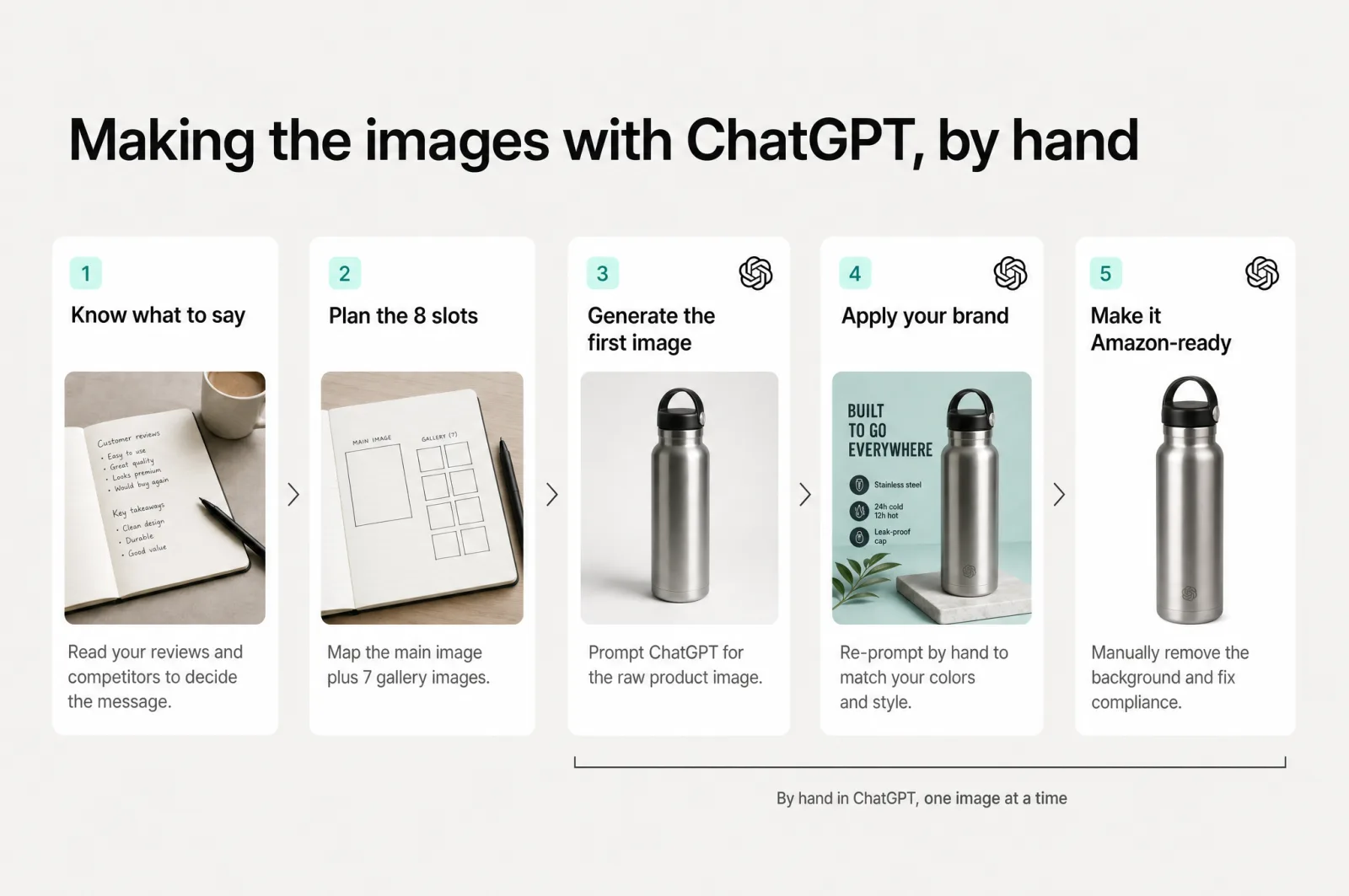
The treadmill you are trying to get off
Think about why you reached for ChatGPT in the first place. It was not curiosity. It was the alternative.
The old way of getting product images is a coordinated, multi-step project: brief a freelancer or agency, wait on a shoot, review concepts, request revisions, wait again. You have weighed those alternatives already, an agency at four figures a listing, or a full-time hire that is a salary and a management problem you do not have the bandwidth for.
The numbers back up the dread. A full listing image set runs $200 to $500, and a complete package with A+ content and branding runs $400 to $1,000 or more [1]. Per image, agencies land anywhere from $100 to $300 and up [2].
Yet the invoice is not the real tax. The real tax is the days-to-weeks of coordination and the revision ping-pong, plus the energy it takes to keep the whole thing moving while you run everything else.
That exhaustion is the actual enemy. Not the price, the drain of organizing it.
So you tried to own it yourself, and ChatGPT was the obvious first move. It is free, it is fast, and it makes a nice picture. The trouble is what happens after the picture.
ChatGPT is an image tool, not a listing tool
Here is the honest part most comparisons skip. ChatGPT's images come from OpenAI's GPT Image family, currently gpt-image-2 [3], the model marketed as ChatGPT Images 2.0 that added a reasoning step and much stronger in-image text [4]. It is a frontier model, and it is good.
Scalable runs on the same class of model. So does most of the serious tooling in this space. The raw image quality is not the difference, and anyone telling you their AI "makes a better image" is selling you the wrong story.
The real difference is the job each tool is built to do. ChatGPT is built to make an image. A converting Amazon listing is not an image, it is a workflow.
You figure out what to say, say it across 8 slots in the right order, keep one brand look on every slot, and format it all to Amazon's rules. ChatGPT does the first tenth of that beautifully and hands you the rest. A dedicated AI product image generator is built to own the whole thing.
Your ecommerce product photography lives or dies on that whole thing, so the rest of this post walks it dimension by dimension.
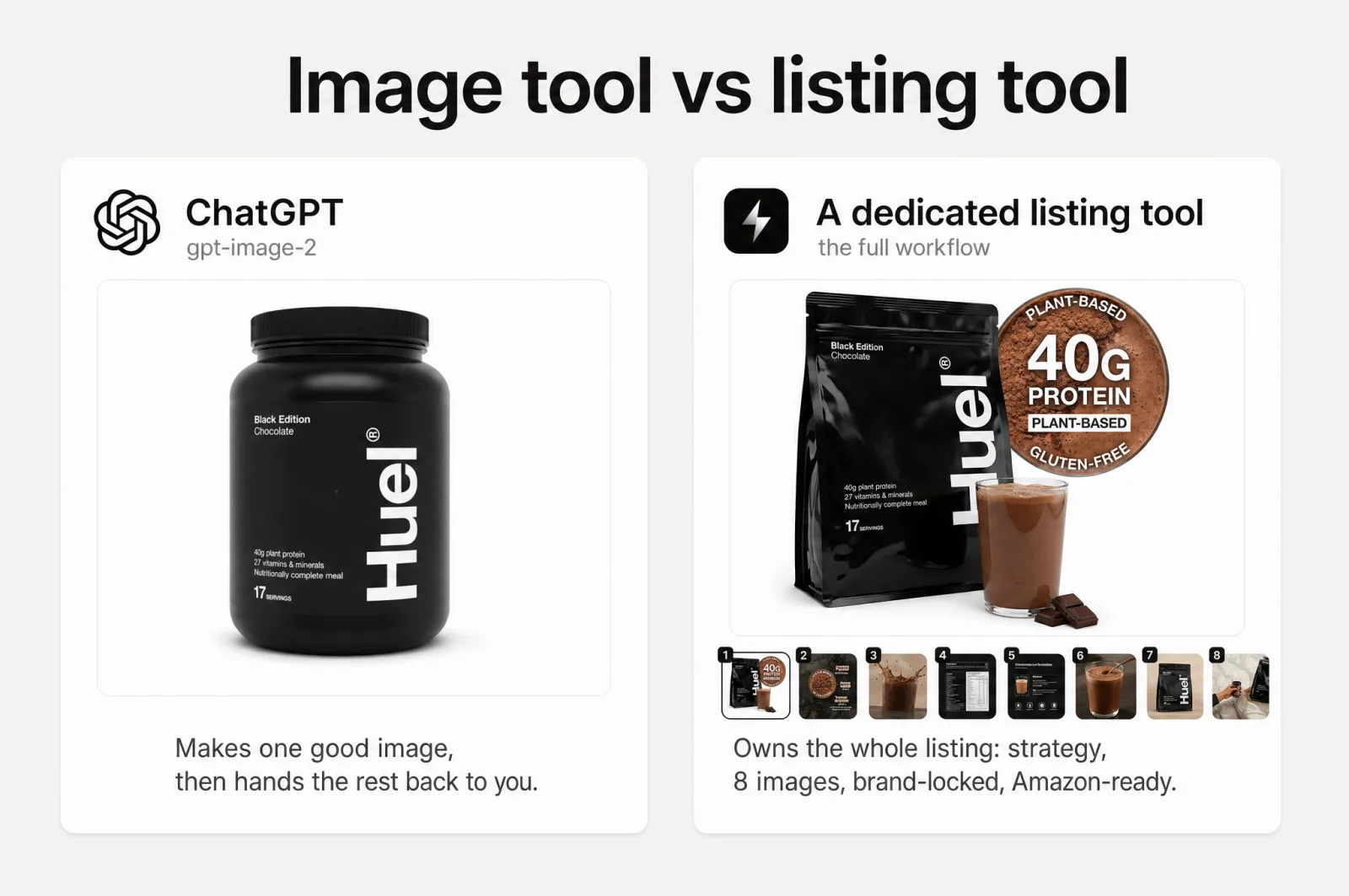
AI product photography, head to head: ChatGPT vs Scalable
Here is the comparison at a glance, then the detail that matters underneath it. Sources for each row are cited in the sections below.
| Dimension | ChatGPT (gpt-image-2) | Scalable |
|---|---|---|
| Underlying image model | GPT Image family, current frontier model | Same class of OpenAI and Google models |
| Access to your reviews and competitors | None, it only knows your prompt | Reads up to 500 reviews and competitor listings |
| What to say (strategy) | You write the brief, or it guesses | 8-slot content brief with on-image copy, from your data |
| The full listing sequence | One image per prompt | 1 main plus 7 gallery, planned as a sales sequence |
| Brand consistency across SKUs | Drifts, no persistent brand system | Brand kit locks color, type, vibe, models on every image |
| Amazon-ready export | Manual crop, resize, rename | MAIN and PT01 to PT07 files, zipped to upload |
| Editing | Often a re-roll of the whole frame | Surgical edits: fix or enhance text, erase, replace |
| Commercial rights | You own the output | Same underlying rights, brand-scoped in-product |
| Best at | One-off concepts and hero shots, fast and cheap | The complete, on-brand, Amazon-ready listing |
Knowing what to say
This is the part that quietly eats your evenings. Before a single image, something has to decide what each slot should communicate, in what order, to make a shopper buy.
ChatGPT cannot decide that for your product, because it does not know your product. It knows your prompt, nothing more. Your 1-star reviews, the feature a rival keeps winning on, the thing buyers mention constantly that never makes your gallery: none of it reaches the model. So the strategy is yours to supply, every time, for every SKU.
Scalable starts there instead of at the picture. It reads up to 500 of your reviews and your competitors' listings, ranks the real conversion drivers and the blockers, then turns them into an 8-slot brief with the on-image copy already written in your customers' language. You are not guessing the message. The data already gave it to you.
That is "built on data, not prompts" in one line: the context is the hard part, and ChatGPT starts every generation with none of it. This is also where Amazon listing optimization begins, long before anything is rendered.
Staying on-brand across the whole catalog
This is the one that turns a catalog into a headache. One image in ChatGPT looks great. Generate the next tomorrow, and the lighting, the palette, and the styling have quietly shifted. Holding one exact look across separate generations is a known limitation of the GPT Image model [5], with no memory that locks your brand in place from one shot to the next.
On a single hero, you will not notice. Across 12 products at 8 slots each, that is 96 images that all have to look like one brand, and drift turns a premium listing into something that reads like five different vendors. Even on one listing, those 8 slots still have to feel like a single brand, not a mixed bag.
Scalable handles this with a brand kit: set color, type, vibe, and the model look once, and every generation inherits it. Three directions come back in about 6 min, and the one you pick applies to every slot on every SKU. Consistency stops being something you police by eye and becomes the default.
From there, the same setup spins out every color and size variant and localizes the listing into other Amazon marketplaces, the kind of scale a prompt box cannot reach.
One picture vs the full 8-slot listing
Here is where the prompt-by-prompt grind adds up. Amazon gives you a main image plus 7 gallery slots, so a real listing is 8 images working together [6], not 8 nice pictures.
It is a sequence: the main wins the click, then the gallery confirms the hook, handles objections, shows the differentiator, and closes.
ChatGPT makes one image per prompt with no idea it belongs to a set. You are the one holding the through-line in your head, prompting eight times, hoping slot 6 still agrees with slot 1.
Scalable treats the listing as the unit. One attraction slot tuned for click-through, backed by 21 proven main-image strategies, plus 7 conversion slots that each carry a specific job and its copy. The set is designed as a set, not stitched together after the fact.
Getting it Amazon-ready
Then comes the part nobody warns you about, the pure tedium. Amazon's main image has hard rules: a pure white RGB 255,255,255 background, the product filling about 85% of the frame, and no text, logos, borders, or graphics [6]. Break them and your listing can get suppressed from search.
ChatGPT does not know or enforce any of that. It also hands you a raw file at a fixed size, so cropping, resizing, renaming to Amazon's slot convention, and packaging every asset is on you. Multiply that by every product.
Scalable outputs a compliant main image and exports the whole set already named MAIN and PT01 to PT07, zipped and ready to upload. The tedious last mile is gone.
The hidden-cost tally
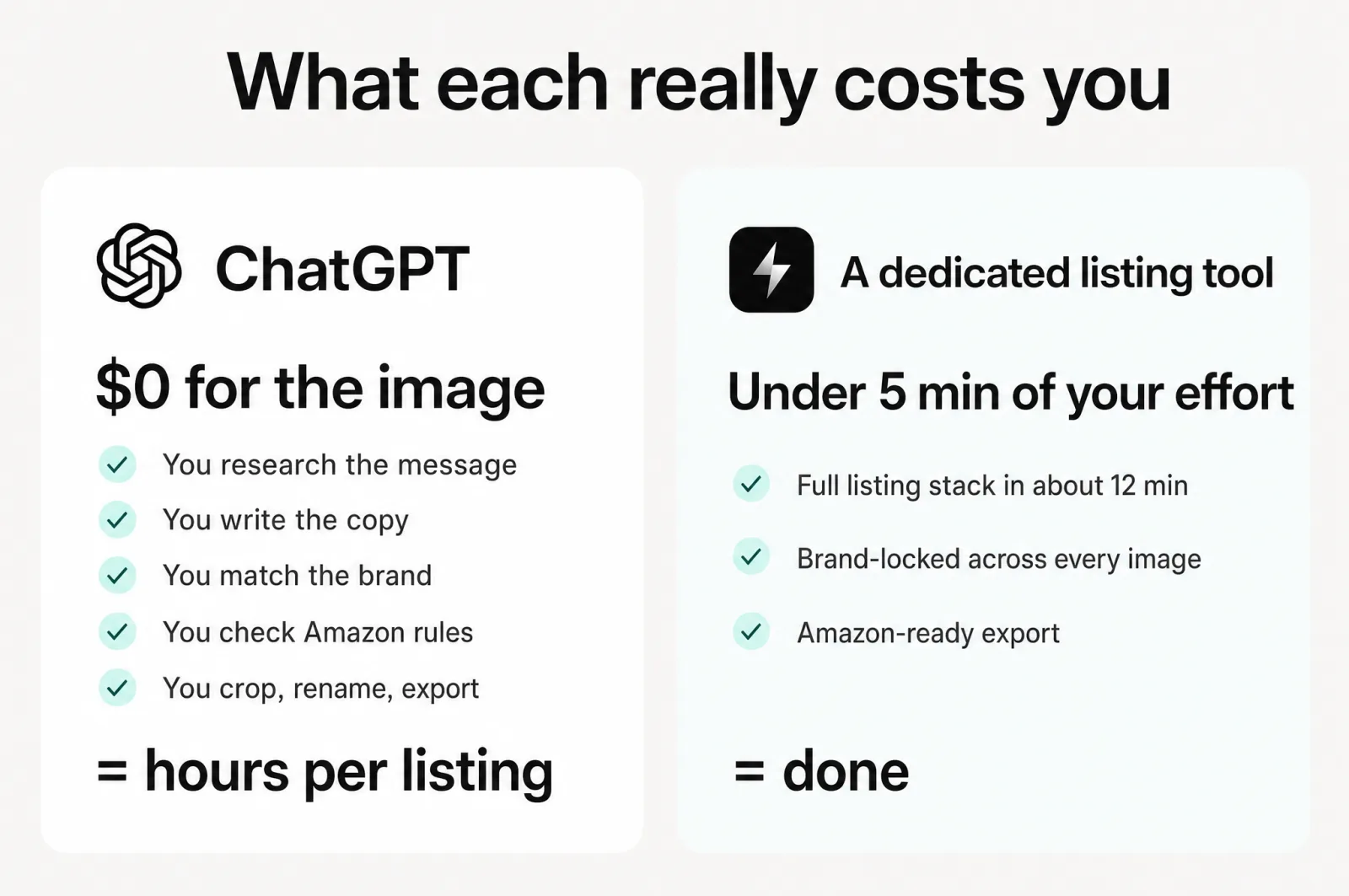
Add it up. ChatGPT gives you a free, fast, good image. Then it hands back the research, the strategy, the copy, the brand-matching across every slot, the compliance check, and the formatting.
That is the same workflow an agency runs for you, or the one you hoped to finally bring in-house, now rebuilt on your own desk one prompt at a time.
"Free" was never the price. The price is your hours and your attention, and against a four-figure agency invoice or a new hire, those hours are exactly what you were trying to buy back. For a growing catalog, that bill is enormous.
That is the real test of any AI product photography tool: not the image, the finished listing.
The contrast is the point. On Scalable, the first product is added in under 5 min of your effort, and the full listing stack comes back in about 12 min with everything above already done.
It is why 7,500+ brands and agencies run their content this way and generate 127k+ assets a month. Not because the images are prettier, but because the workflow is no longer theirs to carry.
So which should you use?
To be clear, ChatGPT is excellent AI product photography, and there are jobs it wins outright:
- Ideation and concepting. Exploring visual directions and moodboards before you commit. It is fast and genuinely creative here.
- A one-off hero or a quick test. A single main image or a fun lifestyle shot in seconds, near enough free.
- No setup, no learning curve. You type, it draws. For a one-product side project, that is hard to beat.
- In-image text. ChatGPT Images 2.0 renders typography well now, a real strength, not a strawman.
And the images are yours to keep: OpenAI's terms assign you ownership of the output, so anything you generate is fine to sell on a listing [7]. Licensing was never the catch.
As product photography software goes, the two are built for different jobs. If you need an image, ChatGPT is a great choice. If you need a listing, the picture is only the first tenth of the work, and the rest is a workflow ChatGPT was never meant to run.
For a brand pushing many SKUs that all have to convert and stay on brand, that is the whole job. Even for a single listing, it is most of it.
Run your own head-to-head
Do not take my word for the gap. Prove it on your own product.
Pick one SKU, ideally a tricky one from your catalog. Build its listing in ChatGPT the way you do now, and time yourself: every prompt, every crop, every rename, every fix. Then add the same product to Scalable's free tier and let it do the research, the strategy, the 8-image set, the brand lock, and the Amazon-ready export. Compare two things: the finished set, and the hours it cost you.
The image will look good in both. The difference will be everything around it, and how much of your week you get back.
Frequently asked questions
- What image model does ChatGPT use for product photography in 2026?
ChatGPT generates images with OpenAI's GPT Image family. The current model is gpt-image-2, marketed as ChatGPT Images 2.0, which added a reasoning step and stronger in-image text. Dedicated tools like Scalable route to the same class of frontier model, so the raw picture quality is comparable. The difference between them is the listing workflow around the generation, not the pixels.
- Can you use ChatGPT-generated images commercially on an Amazon listing?
Yes. OpenAI's terms assign you ownership of the output, so you can sell ChatGPT-generated images on an Amazon listing. Two caveats worth knowing: the rights are granted 'if any' because AI output can be hard to copyright, and similar images may be produced for other users. Licensing is not the blocker. The manual work to make the image listing-ready is.
- Does ChatGPT follow Amazon's main-image rules automatically?
No. Amazon requires a pure white background, the product filling about 85% of the frame, and no text, logos, or graphics on the main image. ChatGPT does not enforce any of this, so you check compliance and fix it yourself. A non-compliant main image can be suppressed from search, which makes this a real risk, not a formality.
- Can ChatGPT keep my product and brand consistent across all the listing images?
Not reliably. Holding one exact product and brand look across separate generations is a known limitation of the GPT Image model, and it drifts across a session or a catalog. There is no persistent brand system to lock color, type, and style. A dedicated tool applies a saved brand kit to every image, so the whole set looks like one brand instead of five.
- ChatGPT or a dedicated AI product photography tool: which for a growing catalog?
Use ChatGPT for one-off concepts, ideation, and quick hero shots, where it is fast, cheap, and genuinely good. For a growing catalog that has to convert and stay on brand across many SKUs, a dedicated tool wins because it owns the whole workflow: research, strategy, the full 8-image set, brand consistency, and Amazon-ready export. The image is the easy part.
Sources
- 1.Twine: how much does Amazon listing design cost?
- 2.ProShot Media Group: product photography pricing in 2026
- 3.OpenAI: image generation (API docs)
- 4.OpenAI: introducing ChatGPT Images 2.0
- 5.Wikipedia: GPT Image
- 6.Amazon Seller Central: product image requirements
- 7.OpenAI: terms of use
- 8.How to make an Amazon main image that wins the click
- 9.Amazon variations: build a full parent listing in 2 clicks
- 10.Get a full Amazon A+ content stack in minutes, on-brand, in-house
- 11.Scalable vs Google Nano Banana Pro: which AI product image generator builds a listing that sells?
- 12.Amazon listing translation isn't enough: how to localize a listing that sells abroad
- 13.8 Amazon listing images, 8 jobs: 1 wins the click, 7 win the sale
- 14.Stop gambling on your Amazon listing
Built by someone who’s lived it.
I’ve been in e-commerce since 2018. I built and exited my own brand, then spent 5+ years running a creative agency for product companies, shipping the listings, ads, and content that move real sales.
Blog post reviewed by Giorgio Gross
Filed under
Launch your full Amazon listing in minutes, in-house and on-brand
Main image, gallery, A+, ads, translations and variations. Built on your reviews, optimized for conversion.
Next recommended read
How to make an Amazon main image that wins the click
Your Amazon main image decides the click. Learn what moves CTR, what the rules allow, and how to test a portfolio of proven strategies fast.
8 min read
More on this topic — playbooks and product deep-dives.

Amazon variations: build a full parent listing in 2 clicks
How to set up Amazon variations (parent-child listings) and get an on-brand image for every color and size, from parent SKU to 2-click generation.
Get a full Amazon A+ content stack in minutes, on-brand, in-house
Amazon A+ content used to mean an agency and weeks of waiting. Here's how to produce a full, on-brand A+ stack in-house, in minutes.

Scalable vs Google Nano Banana Pro: which AI product image generator builds a listing that sells?
Scalable vs Google Nano Banana Pro: can a raw AI product image generator build an Amazon listing that converts? An honest, feature-by-feature comparison.